It was very interesting because I had the opportunity to directly implement air hockey by using the library that I first met in UNIX environment.
Console Air Hockey Game
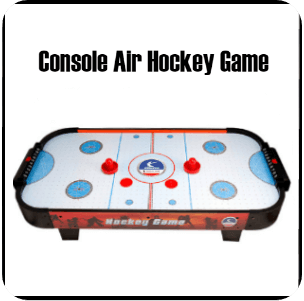
Air Hockey is a game commonly seen in the arcade, where two players have their own sticks (from now on, it means " bar ") and who puts more balls (from now on, it means " puck ") into each other's goal. These air hockey games were implemented so that two processes operated on a Unix-based basis, and they communicate with each other using an IPC technique.
Design
The design aims to comply with the limitations given in this project and to make the most of lessons learned in advanced programming classes available for two users to play the air hockey smoothly. Therefore, it is designed by dividing it into 4 main categories as shown below.
1.Explain the game UI using Unix Curses header files
(1) Space to play ( it means 'map')
- Initialize the map with a two dimensional layout. Reset the top of the map to 2, the bottom of the map to 3, the left and right sides to 1, and the rest to 0.
- print out characters to display the map in the appropriate location according to the values in the initialized two dimensional array
(2) Puck output
- Using a screw thread, adjust the value of the puck to the direction and speed of the X and Y coordinates to output a puck.
(3) The user's bar output (P1 / P2)
- Use a thread to input keyboard values from two users, print characters to display bars by moving the X coordinate to the appropriate location.
(4) Printing the remaining game time
- The pre-set game time is continuously reduced every second using a thread and printed on the screen.
(5) Live score output
- Calculate and print the player's acquisition score in real time.
(6) Printing the results of a game
- When the game ends with a predetermined amount of time, calculate the result of the game and print the result in the appropriate location.
(7) Since two users play the game, print out two game interfaces.
● All threads used to print access the cursors of the terminal and therefore thread synchronization is needed.
2. Process the bar movement based on user keystrokes and keystrokes
(1) Create a new child process with FORK / EXEC and the child process uses a thread to input the keyboard values of two users and then forwards the keyboard values to the parent process through communication between the two processes.
(2) Player 1 is moved using the keys A and S on the keyboard, and player 2 is moved using keys K and L on the keyboard.
(3) For the communication technique, use Shared Memory and Pipe.
3. Dealing with collision between bar and chartchap and puck
(1) When moving the puck between coordinates, move the map and the player bar to see if they conflict. If they collide, they can properly redirect and increase the score of the appropriate players on the map.
(2) The direction of the puck is 6 directions.(LEFT_TOP/TOP/RIGHT_TOP/LEFT_BOTTOM/BOTTOM/RIGHT_BOTTOM)
4. Other Elements
(1) Because two players need to be serviced, the game screen must also be printed out.
(2) Make the cursor provided by the terminal invisible during a game.
(3) When the user sends a SIGTERM signal to CTRL-C or at the end of the game, the set cursor must be changed to be visible again.
(4) The program has made basic exceptions with reference to the secure coding guide documentation. Secure coding technique was used to perform a strong type check when converting an integer to a character by accepting keyboard values from the user.
Results
In reality, the air hockey game in the arcade is a field (from now on, it means " map ") that serves as a stadium, a puck, a timer that measures individual bars and game times, and the score of players. These components for the game were applied as follows in a UNIXS-based air hockey game.
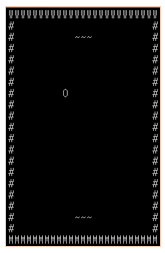
The side, which consists of " # " and " W " and " M " sides, respectively are the normal walls, and the top and bottom sides corresponding to the side, respectively, the " goalpost " of player 2 and player 1.
- The area marked ' 0 ' is the puck. And the ' ~ ~ ' shape is what makes the individual bars.
- If the puck is in contact with both sides, up or down sides, the puck will be thrown at an angle to reflect the direction in which it was travelling (an angle), and if it strikes the goal, the corresponding player will be awarded the score.
- Just as it would be in a collision with a face, the puck and bar are also thrown at an angle of reflection from the incident angle.

Left is player 1's score. This is where the value (the score in Player 1) increases when the puck into the goal of player 2 in the first picture.
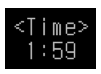
Timer (limited game time). When the game begins, a total of two minutes are measured, and when the time is up, the winner marks the one who scores more points against the players ' values.
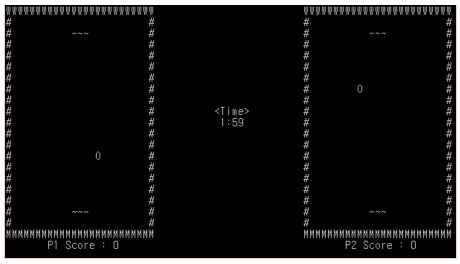
It's the whole screen of the game. Figure 1, 2, 3, and 4, as mentioned previously, are composed as above. The map on the left is the game screen for player 1 to play and the map on the right is the game screen for player 2 to play. In order to create a feeling of being actually face-to-face, the other person's game screen shows a 180 degree reversal in the direction of each puck and bar's movement on its screen.
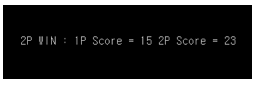
Finally, as shown in the picture above, the winner and each player's earned points are printed at the end of the game.
My efforts were rewarded
What I learned through this project